Step 03

Process Control Block (PCB)

The PCB is the data structure in which the operating system stores everything it knows about a process. Without it, switching between processes would be impossible.

What exactly is a PCB?

A Process Control Block (PCB) is a data structure used by the operating system to store all the important details about a process. It is sometimes also called a process descriptor or task control block.

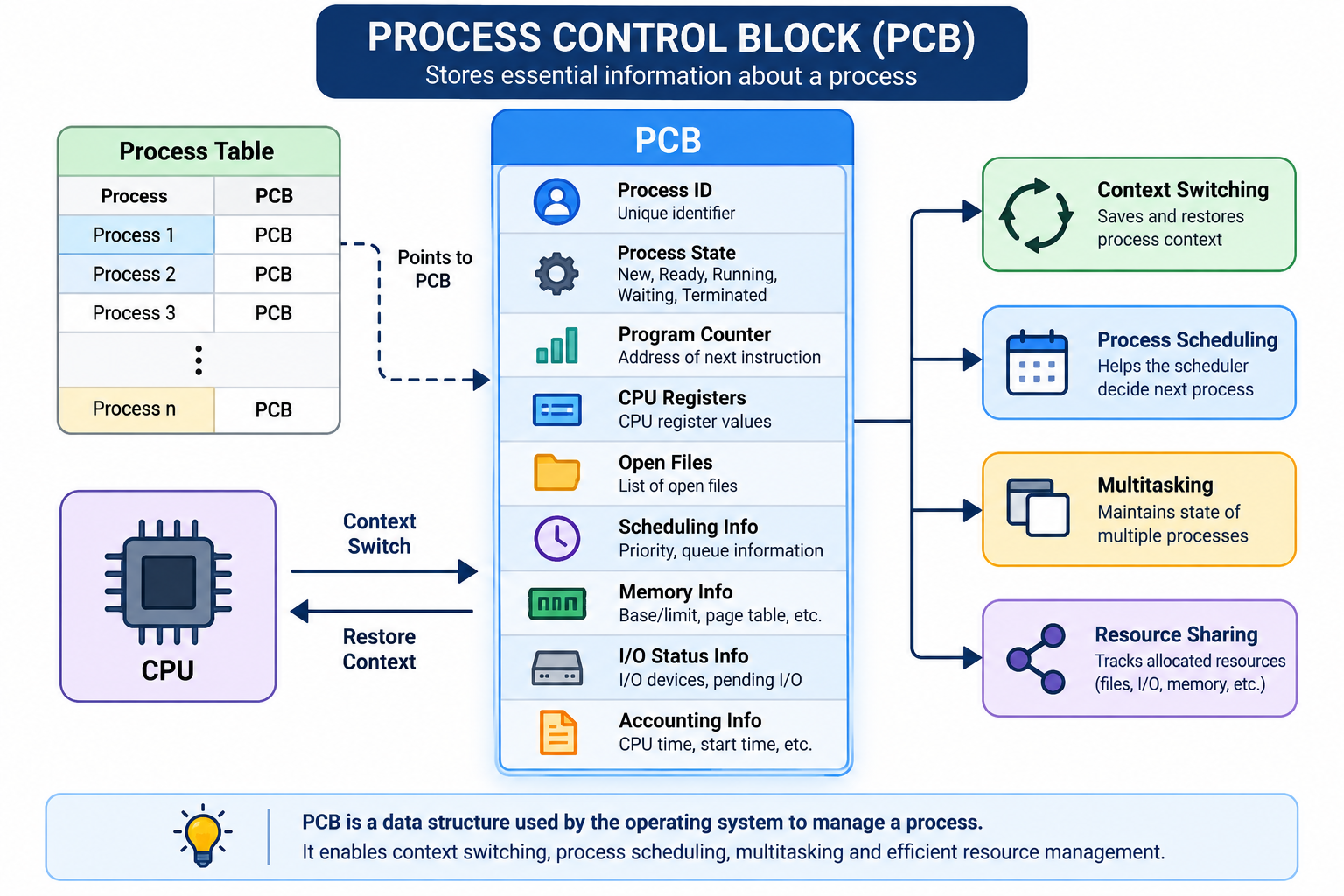
Each process in the system has its own PCB, and all these PCBs are maintained in a process table inside the operating system's kernel. Whenever a new process is created, the OS automatically creates a PCB for it. This PCB keeps track of all process-related information, including its current state such as new, ready, running, waiting, or terminated.

PCBs are essential for managing processes because they are continuously accessed and updated by system components like schedulers and resource managers. They are especially important during context switching, where process information needs to be saved and restored.

Context — the saved values of the PC and CPU registers of a process
Context switch — saving one process's context and loading another's so it can run

Real-world analogy: The patient file

A hospital keeps one file per patient: ID, current condition, treatment given so far, medicines, room number. If the doctor pauses to see another patient, everything is written in the file so treatment can resume perfectly later. That file is the PCB.
Diagram of a Process Control Block (PCB) showing the process table, the CPU performing a context switch, the nine PCB fields, and related concepts like context switching, process scheduling, multitasking, and resource sharing.
Figure 3.1 — Structure of a Process Control Block. The process table links each process to its PCB; the CPU exchanges state with a PCB during a context switch, enabling context switching, process scheduling, multitasking, and resource sharing.
Structure of a Process Control Block

A PCB contains several pieces of information required for effective process management. Some of the key components are:

Process ID (PID) — a unique identifier assigned to each process
Process State — indicates the current status of the process (new, ready, running, waiting, or terminated)
Program Counter — stores the address of the next instruction to be executed
CPU Registers — holds the values of registers such as accumulators, stack pointers, index registers, and general-purpose registers
List of Open Files — contains references to files that the process is currently using
CPU Scheduling Information — includes details like process priority and pointers to scheduling queues
Memory Management Information — contains data related to memory usage such as page tables, segment tables, base and limit registers
I/O Status Information — stores details about input/output devices and operations associated with the process
Accounting Information — includes execution time, process usage statistics, account details, and other related data
Experiment: PCB explorer — click any field
PCB — Process 1042
PCB field

Process ID (PID)

Unique number identifying the process.

Current value: 1042

Experiment: Context switch, step by step

PCB-1 (P1)

PC: 0x400 · state: Running

CPU

executing: P1

PCB-2 (P2)

PC: 0x8A0 · state: Ready

1/6
P1 is Running on the CPU. P2 is Ready.

During a context switch the CPU does no useful user work — this time is pure overhead, which is why very small time quanta slow the system down.

Quick quiz

1. Which information is NOT normally stored in a PCB?

2. Why must registers be saved during a context switch?

Practice problem

A system performs 500 context switches per second and each switch costs 20 microseconds. What percentage of CPU time is wasted as overhead?