CPU Scheduling
Many processes are ready but there is only one CPU. The scheduler decides who runs next. Change the numbers below and see instantly how the Gantt chart and the average waiting time change.
A computer runs many programs at once — the browser, the music player, the compiler, dozens of background services — yet it usually has only one (or a few) CPUs. Process scheduling is the activity of the operating system that decides which process owns the CPU at any given moment, and for how long. The part of the OS that makes this decision is called the scheduler, and the code that performs the actual switch is the dispatcher.
Good scheduling has three goals: keep the CPU busy (high utilisation), finish many jobs quickly (high throughput), and keep users happy by responding fast (low response time) and not making any single job wait too long (low turnaround time). These goals often conflict — favouring short jobs raises throughput but can starve a long job — so every scheduling algorithm is a different trade-off.
Real-world analogy: A railway control room
Operating systems mainly use three types of schedulers to manage process execution and memory efficiently. Each one moves a process from one queue to another:
| Scheduler | Also called | Moves process… | Frequency | Main goal |
|---|---|---|---|---|
| Long-term | Job scheduler | New → Ready (admits a job from the pool on disk into memory) | Rarely (seconds–minutes) | Control the degree of multiprogramming |
| Short-term | CPU scheduler | Ready → Running (selects which ready process gets the CPU next) | Very often (milliseconds) | Maximise CPU utilisation & responsiveness |
| Medium-term | Swapper | Ready/Running ↔ Suspended (swaps processes out to disk and back) | Occasionally (when memory is tight) | Balance memory load, enable swapping |
1. Long Term Scheduler (Job Scheduler)
The long term scheduler is responsible for selecting processes from the job pool (stored on disk) and loading them into the main memory (RAM). Once loaded, these processes move into the ready state.
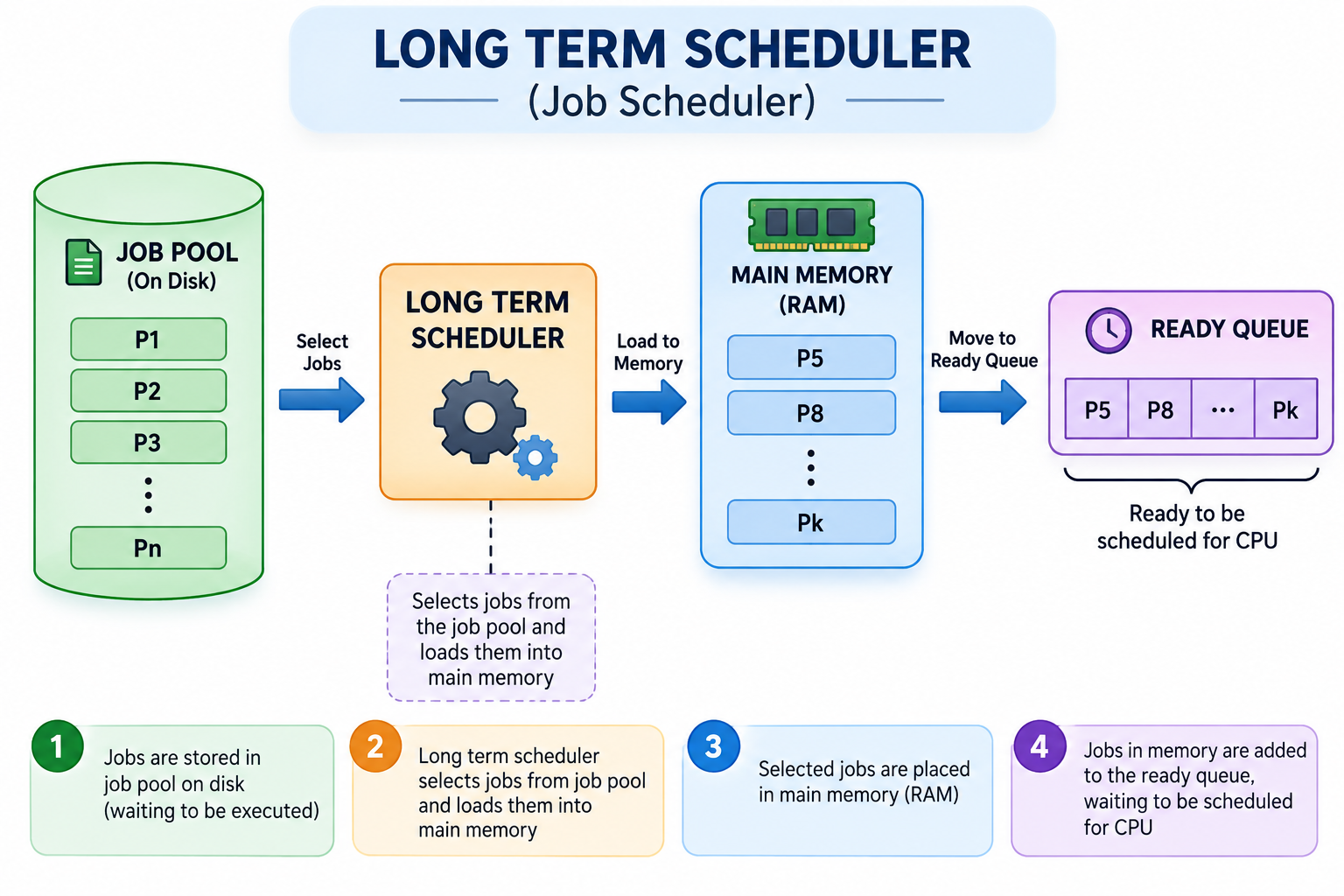
- Multiprogramming: Controls how many processes are present in memory at a time (degree of multiprogramming).
- Selection criteria: Selects processes based on factors like priority, resource needs, or execution time.
- Frequency: Invoked less frequently (every few seconds or minutes).
- Speed: Slowest scheduler because it involves heavy disk operations.
2. Short Term Scheduler (CPU Scheduler)
The short term scheduler chooses a process from the ready queue and assigns it to the CPU for execution.
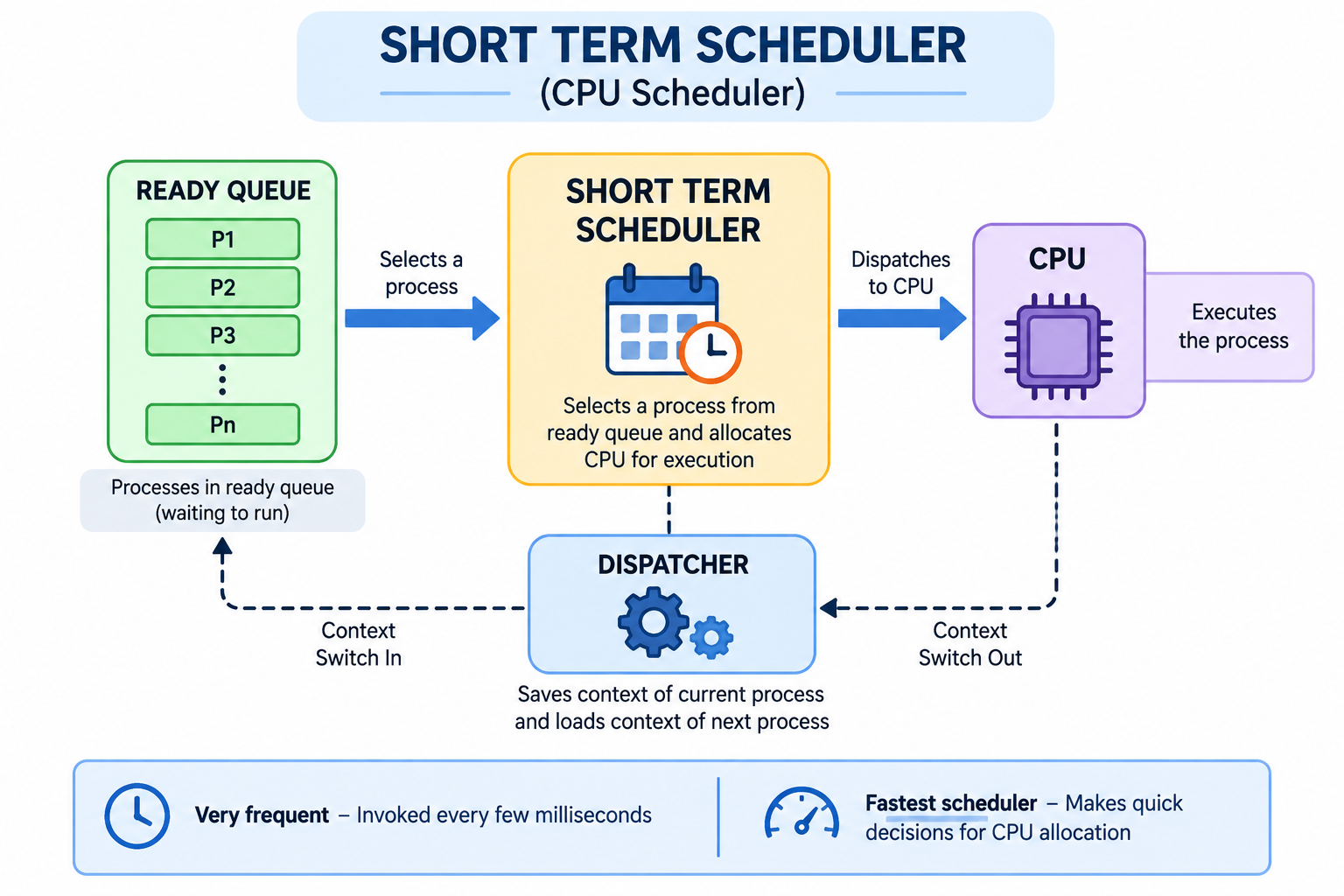
- Algorithms: Works with scheduling algorithms like FCFS, SJF, and Round Robin.
- Frequency: Runs very frequently (every few milliseconds).
- Speed: Fastest scheduler because decisions must be made extremely quickly.
- Dispatcher: Uses a dispatcher to physically switch the CPU between processes (saving state, loading state, transferring control). The time taken for this switch is called dispatch latency.
3. Medium Term Scheduler (Swapper)
The medium term scheduler manages memory by temporarily removing processes from RAM and storing them on disk. This process is called swapping.
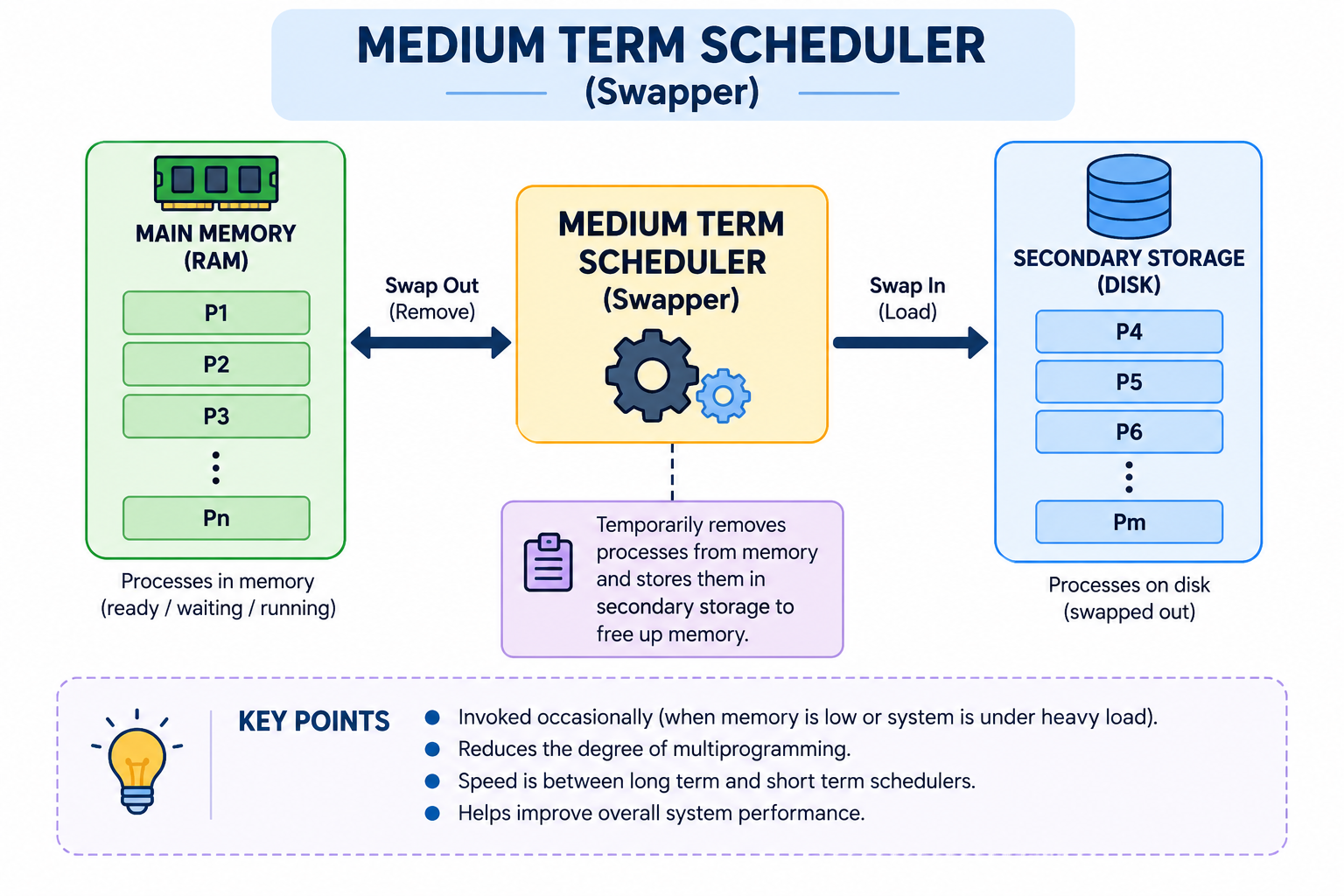
- Memory load: Reduces memory load by suspending some processes.
- Performance: Helps improve overall system performance during heavy load.
- Frequency: Invoked occasionally when memory is limited.
- Speed: Speed is between long term and short term schedulers.
Together, the long-term scheduler controls entry into the system, the short-term scheduler controls entry into the CPU, and the medium-term scheduler can pull a process out to disk (suspend) and re-introduce it later.
   [Pool of jobs]            [Ready queue]            [CPU]
   on disk                  in memory                (Running)
      │                        ▲                        │
      │  long-term             │  short-term             │  time slice
      └─────── admit ──────────┘  schedule ─────────────┘  expires / block
                                    │                        │
                                    │      medium-term        │
                                    │   suspend ◀────────────┤
                                    │   resume  ──────▶      │
                                 [Suspended / swapped out]   │
                                      (on disk)              ▼
[Terminated]Every process the OS knows about sits in one of several queues. The two queues you will keep meeting are the job queue (every process in the system) and the ready queue (processes in memory, waiting only for the CPU). Processes that are blocked on an I/O operation sit in the device queue for that device. The OS keeps a queue for each device, so I/O-bound and CPU-bound processes naturally separate.
When the short-term scheduler picks a new process, the dispatcher performs a context switch: it saves the running process's register values and program counter into its PCB, loads the next process's saved state from its PCB, and hands control to the next process. This switch is pure overhead — no useful work happens during it — so a good scheduler tries not to switch more often than necessary.
Non-preemptive
Once a process gets the CPU, it keeps it until it finishes or yields (e.g. for I/O). No other process can force it off. FCFS and non-preemptive SJF/Priority work this way. Simple and predictable, but a long job can hold everyone up.
Preemptive
The OS can interrupt the running process — when its time slice ends, or when a higher priority process arrives — and give the CPU to someone else. Round Robin, SRTF and preemptive Priority work this way. Better responsiveness, but more context-switch overhead.
Real-world analogy: One chef, many customers
Interactive lab
CPU Scheduling Algorithms
Compare how each scheduling policy allocates CPU time, builds the Gantt chart, and affects process wait times.
| Process | Arrival time | Burst time | Priority | |
|---|---|---|---|---|
Average waiting time: 5.75 ms
Average turnaround time: 10.25 ms
Selected algorithm
FCFS (First Come First Served)
Gantt chart
| Process | AT | BT | CT | TAT = CT − AT | WT = TAT − BT | RT |
|---|---|---|---|---|---|---|
| P1 | 0 | 5 | 5 | 5 − 0 = 5 | 5 − 5 = 0 | 0 |
| P2 | 1 | 3 | 8 | 8 − 1 = 7 | 7 − 3 = 4 | 4 |
| P3 | 2 | 8 | 16 | 16 − 2 = 14 | 14 − 8 = 6 | 6 |
| P4 | 3 | 2 | 18 | 18 − 3 = 15 | 15 − 2 = 13 | 13 |
Step-by-step trace
- t=0: P1 is selected (earliest arrival) and runs to completion.
- t=5: P1 finished. Completion time = 5.
- t=5: P2 is selected (earliest arrival) and runs to completion.
- t=8: P2 finished. Completion time = 8.
- t=8: P3 is selected (earliest arrival) and runs to completion.
- t=16: P3 finished. Completion time = 16.
- t=16: P4 is selected (earliest arrival) and runs to completion.
- t=18: P4 finished. Completion time = 18.
| Algorithm | Preemptive? | Strength | Weakness |
|---|---|---|---|
| FCFS | No | Simplest, fair by arrival order | Convoy effect: a long job delays everyone |
| SJF | No | Minimum average waiting time | Needs burst time in advance; starvation of long jobs |
| SRTF | Yes | Even better averages than SJF | Frequent context switches; starvation |
| Priority | Both | Important jobs run first | Low-priority starvation (fix with ageing) |
| Round Robin | Yes | Fair, great response time for interactive users | Too small a quantum = high context-switch overhead |
1. Which algorithm gives the minimum average waiting time (non-preemptive)?
2. The convoy effect is a problem of:
3. In Round Robin, what happens if the quantum becomes very large?
Processes: P1(AT 0, BT 4), P2(AT 1, BT 3), P3(AT 2, BT 1). Compute the average waiting time using FCFS. Then verify with the simulator above.